





NEWYou can now listen to Fox News articles!
Using the Notes app on your iPhone as a messaging app is a surprisingly clever way to have a discreet conversation. You can use it to plan a surprise party for a loved one or disguise sensitive communication in a public setting.
The process of setting it up is easy, and it will have you chatting with the other person privately in minutes. You just need to create the note in the Notes app, add them as a collaborator and start sending secret messages back and forth. Here’s how to do it.
Sign up for my FREE CyberGuy Report
Get my best tech tips, urgent security alerts and exclusive deals delivered straight to your inbox. Plus, you’ll get instant access to my Ultimate Scam Survival Guide — free when you join my CYBERGUY.COM/NEWSLETTER
5 PHONE SETTINGS TO CHANGE RIGHT NOW FOR A SAFER SMARTPHONE
How to use the Notes app as a secret messaging app
Before you start, ensure you’ve updated your iPhone. The other person you want to add to the secret conversation also needs to have an iPhone that’s updated (it won’t work with Android users).
Once everyone is set, do the following:
- Open the Notes app on your iPhone
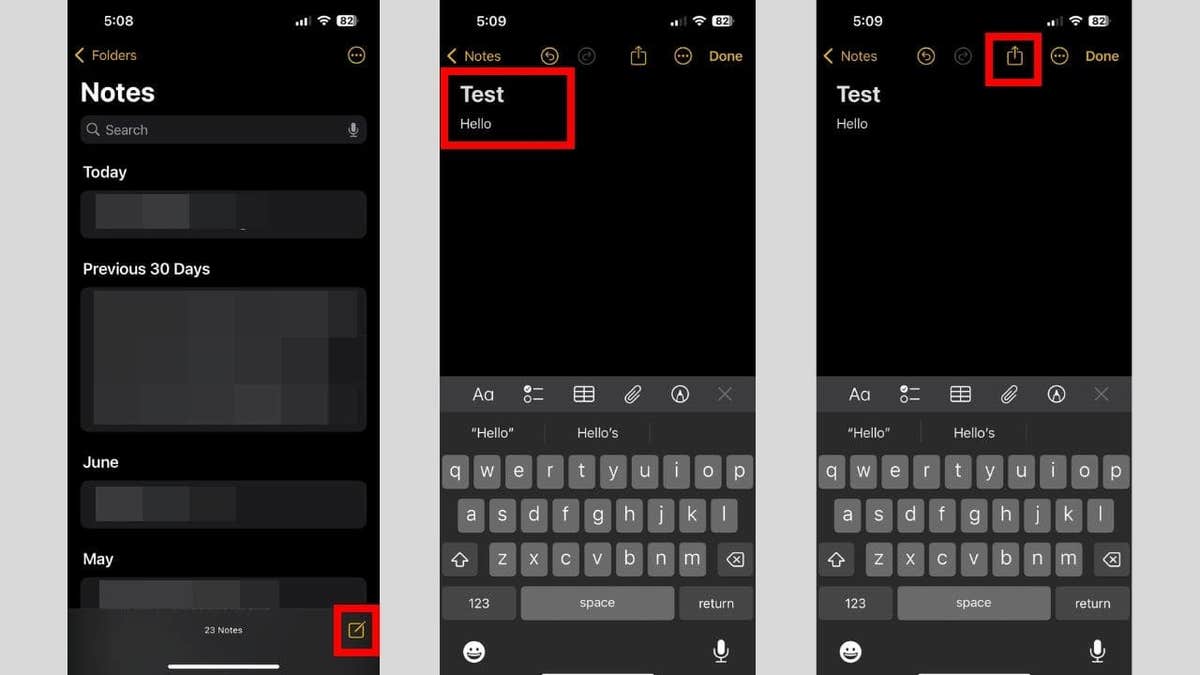
- Tap the compose (pencil) icon in the bottom-right corner to create a new note
- Give the note a title. It can be something related to the conversation you want to have or something boring that no one will think of opening. You can also leave it blank. Typing something in the body of the note, something like “Hello,” will do the trick
- Tap the share icon in the top-right corner of the screen
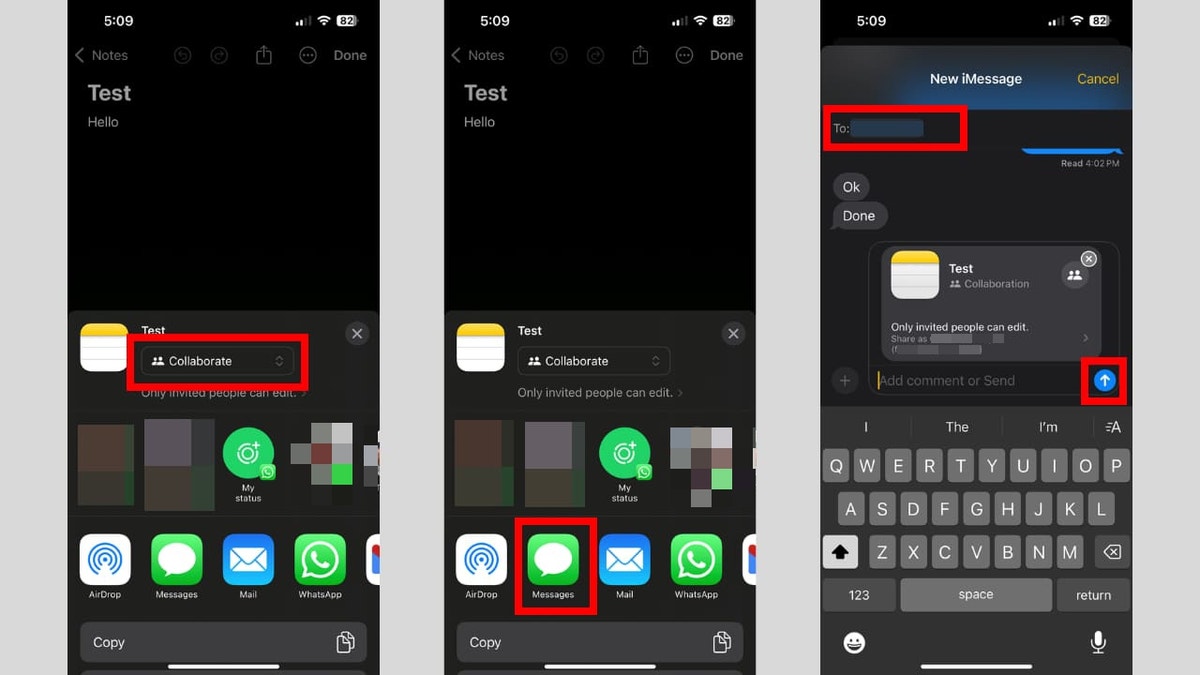
- You will see a drop-down box below the title of the note. Make sure it says Collaborate, as this is the option that generates an invite link to edit the note. If it says “Send Copy” instead, tap it and select “Collaborate” from the menu.
- If prompted, add the contact’s Apple ID, email address or phone number of the person you want to share with.
- Select your sharing method; usually, Messages is the default.
- The collaboration link will open in a new message.
- Enter the recipient’s Apple ID email or iPhone number in the “To:” field within Messages (or choose from contacts).
- Tap the blue send arrow in the Messages app to deliver the invite.
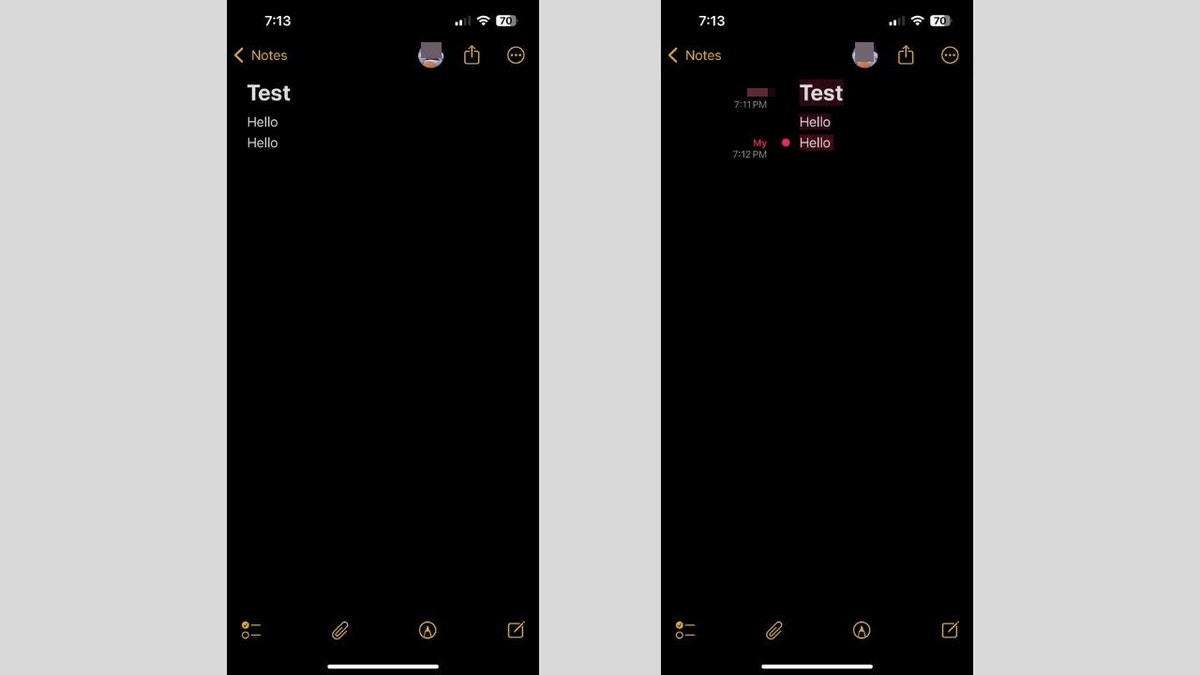
Once the other person opens the note, you can start instant messaging. Neither of you needs to hit the send button because the edits will be visible once you finish typing. You will get a notification that someone has made an edit. If you get confused about who wrote what, swipe right to check the name next to each edit.
WHAT IS ARTIFICIAL INTELLIGENCE (AI)?
In case you want to secure the conversation
When you’re done chatting and don’t want to leave a paper trail, you can stop sharing the note. This will remove it from the other person’s device, and that person will no longer have access to it. Afterward, you can delete it on your end.
Follow the steps below:
- Tap their picture icon in the top right corner
- Tap Manage Shared Note in the menu
- Tap Stop Sharing at the bottom
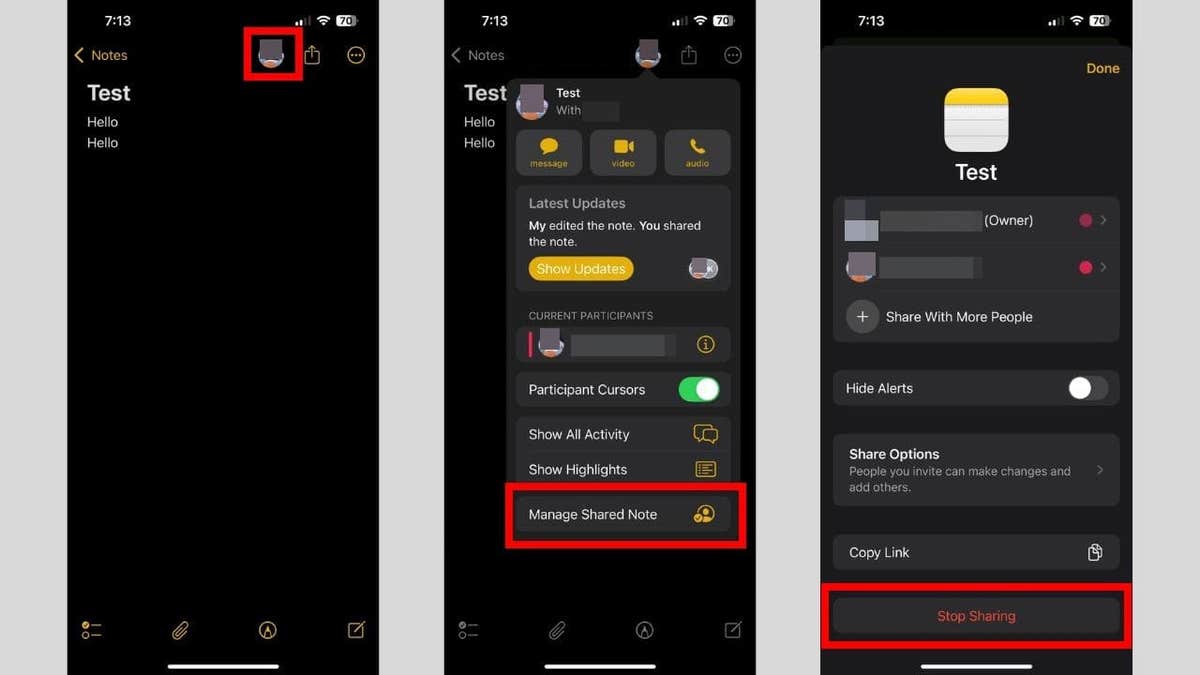
- Tap Stop Sharing in the pop-up
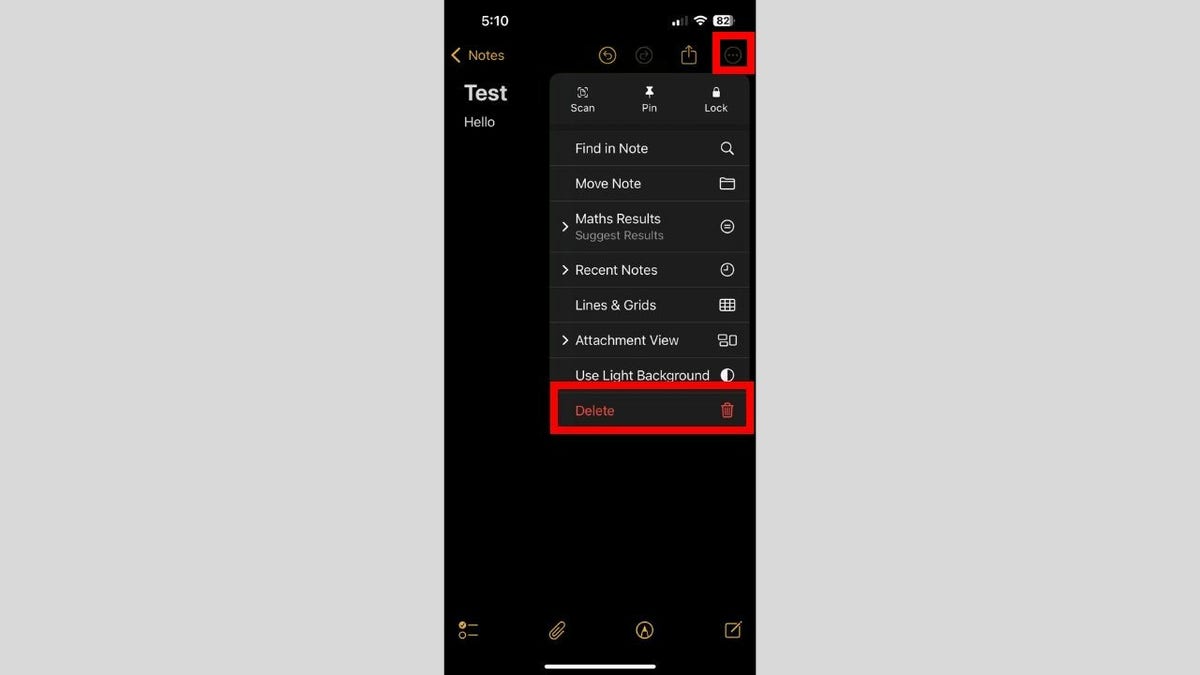
- Tap the three-dot icon in the top right corner and select Delete in the menu
What this means for you
Choosing the Notes app as your discreet messaging tool puts you in control of your privacy, all without installing anything new. You can start a confidential chat right inside an app you’re already comfortable with. Since the conversation blends in as a regular note, it’s much less likely to draw curiosity.
This approach is ideal when you want to quickly coordinate plans, share sensitive details or just keep things low-key in public spaces. Messages sync instantly between you and your collaborator. There’s no separate “send” button required, and you’ll always know who added which note with color highlights and names.
If you ever need to make the conversation vanish, it’s simple. Just stop sharing the note, and it disappears from your partner’s device immediately. After that, deleting the note on your end wipes the slate clean, giving you full peace of mind. Everything happens inside your iPhone’s built-in toolkit, making secret messaging fast and secure.
Kurt’s Key Takeaways
Who would have guessed the ordinary Notes app could double as a secret chat room? This method is so inconspicuous that anyone glancing at your phone will think you’re jotting down groceries or ideas, not exchanging private messages. It’s subtle, smart and makes the most of what’s already on your device. Just remember that when your quiet conversation is over, tidy up behind you. Stop sharing and then delete the note to keep things truly under wraps. Sometimes, the best privacy solutions are hidden in the apps you use every day.
Do you have any other clever uses for the built-in apps on iPhone? Let us know in the comments below. Let us know by writing to us at Cyberguy.com/Contact
Sign up for my FREE CyberGuy Report
Get my best tech tips, urgent security alerts and exclusive deals delivered straight to your inbox. Plus, you’ll get instant access to my Ultimate Scam Survival Guide — free when you join my CYBERGUY.COM/NEWSLETTER
Copyright 2025 CyberGuy.com. All rights reserved.
Read the full article here